
Top 4 AI Video Creation Tools for YouTube in 2026 (Complete Guide)
The world of content creation has completely changed. In 2026, you don’t need expensive cameras, professional studios, or a big editing team to create high-quality YouTube videos. Thanks to Artificial Intelligence (AI), anyone can start a YouTube channel and produce professional content from a laptop or even a smartphone.
AI video tools can turn articles into videos, generate AI avatars, convert scripts into engaging visuals, and even automatically edit short-form content for platforms like YouTube Shorts, Instagram Reels, and TikTok.
In this detailed guide, we’ll explore the Top 4 AI Video Creation Tools for YouTube:
- Pictory
- Synthesia
- InVideo
- CapCut
We will also discuss features, pros and cons, pricing, and how you can earn money using these AI tools.
Let’s get started.
1️⃣ Pictory – Turn Articles into Videos Automatically
If you already write blog posts, Pictory can transform your articles into professional videos within minutes.
🔹 What is Pictory?
Pictory is an AI-powered video creation tool that converts long-form content such as blog posts or scripts into engaging videos with visuals, subtitles, background music, and voiceovers.
It is perfect for:
- Bloggers
- Affiliate marketers
- YouTube automation channels
- News content creators
🔹 Key Features
- Article to video conversion
- Automatic caption generation
- AI voiceovers
- Royalty-free stock footage
- Easy editing interface
🔹 Why It’s Great for YouTube
You can simply:
- Copy your blog article.
- Paste it into Pictory.
- Let AI generate scenes automatically.
- Export and upload to YouTube.
This saves hours of manual editing.
🔹 Pros
✔ Beginner-friendly
✔ No video editing experience required
✔ Saves massive time
✔ Perfect for faceless YouTube channels
🔹 Cons
✘ Limited customization compared to advanced editors
✘ Paid plans required for watermark removal
🔹 Who Should Use It?
If you already run a blog and want to repurpose content into videos, Pictory is an excellent choice.
2️⃣ Synthesia – Create AI Avatar Videos
Want to create videos without showing your face? Synthesia solves that problem.
🔹 What is Synthesia?
Synthesia is an AI video platform that allows you to create videos using AI avatars. You simply type your script, choose an avatar, and the AI generates a talking-head style video.
It is widely used for:
- Educational videos
- Corporate training
- Explainer videos
- YouTube automation
🔹 Key Features
- 100+ AI avatars
- Multiple language support
- Custom avatar option
- Studio-quality video output
- Script-to-video conversion
🔹 Why It’s Powerful
You don’t need:
- Camera
- Microphone
- Studio
Just type your script and generate a professional AI presenter video.
🔹 Pros
✔ Professional look
✔ Multiple language options
✔ Perfect for international audiences
✔ No filming required
🔹 Cons
✘ Premium pricing
✘ Limited emotional expression
🔹 Best Use Case
If you want to create educational or informational videos without showing your face, Synthesia is one of the best AI tools available.

Best mobile for this👉🏿https://amzn.to/4rvzKNX

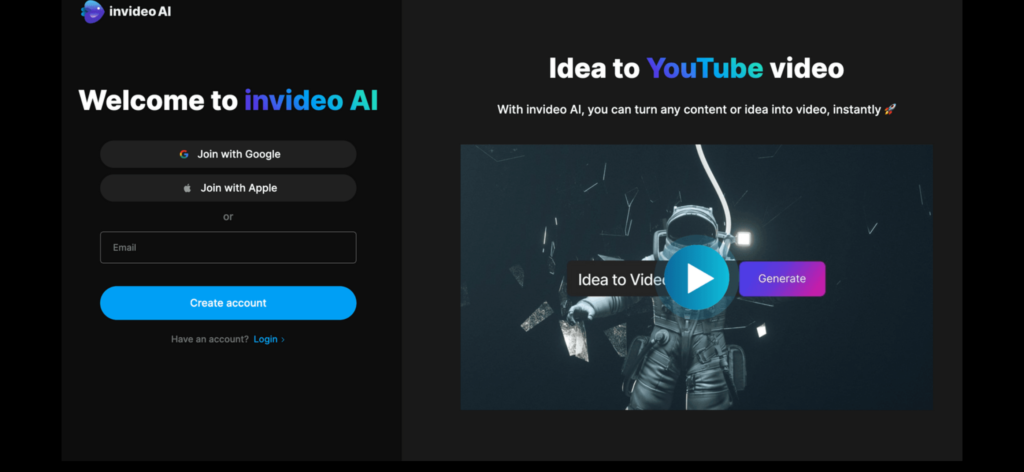
3️⃣ InVideo – Script to Stunning Videos
InVideo is one of the most popular AI video editors among YouTubers.
🔹 What is InVideo?
InVideo is an online video creation platform that turns text prompts or scripts into fully edited videos.
It is ideal for:
- YouTube creators
- Social media marketers
- Affiliate marketers
- Small businesses
🔹 Key Features
- AI script to video
- 5000+ customizable templates
- Text-to-speech
- Automatic scene suggestions
- Stock media library
🔹 Why YouTubers Love It
You can:
- Enter a topic.
- Let AI generate a script.
- Automatically create visuals.
- Export in YouTube format.
🔹 Pros
✔ Very easy to use
✔ Template-based editing
✔ Good free plan
✔ Fast video production
🔹 Cons
✘ Watermark in free version
✘ Internet required (browser-based)
🔹 Best For
Creators who want flexibility and customization along with AI assistance.

https://amzn.to/4rYpKheBest mobile for this👉🏿

4️⃣ CapCut – Best for Shorts & Reels
If you are serious about YouTube Shorts or Instagram Reels, CapCut is a must-have tool.
🔹 What is CapCut?
CapCut is a powerful AI-powered video editing app available on mobile and desktop.
It is widely used for:
- Short-form videos
- Reels
- TikTok content
- Viral editing
🔹 Key Features
- AI auto captions
- Background remover
- AI voiceover
- Trendy effects
- Auto beat sync
🔹 Why It’s Best for Shorts
Short-form content is dominating YouTube in 2026. CapCut helps you:
- Create viral-style edits
- Add subtitles automatically
- Use trending effects
- Edit directly from your phone
🔹 Pros
✔ Free version available
✔ Mobile-friendly
✔ Fast editing
✔ Ideal for beginners
🔹 Cons
✘ Not ideal for long documentary videos
💰 How to Earn Money Using AI Video Tools
Now let’s talk about what matters most — earning potential.
You can monetize AI video content through:
1️⃣ YouTube Monetization
After reaching:
- 1,000 subscribers
- 4,000 watch hours
You can earn from ads.
2️⃣ Affiliate Marketing
Create review videos about:
- AI tools
- Gadgets
- Software
Add affiliate links in description.
3️⃣ Digital Products
Sell:
- Courses
- E-books
- Prompt bundles
4️⃣ Client Work
Offer:
- AI video creation services
- Social media editing
- YouTube automation setup
Many businesses pay for AI video services.
🚀 Final Verdict – Which One Should You Choose?
If you are a blogger → Choose Pictory
If you want AI avatar videos → Choose Synthesia
If you want flexible editing → Choose InVideo
If you want viral Shorts → Choose CapCut
For beginners, CapCut + InVideo combination works perfectly.
🔥 Future of AI Video Creation
AI video tools are not just a trend. They are the future of content creation.
In the coming years:
- AI will create hyper-realistic avatars
- Script generation will become smarter
- Editing will become fully automated
- Even voice cloning will improve
Those who start early will benefit the most.
🎯 Conclusion
AI video creation tools have completely removed traditional barriers in content production. You no longer need expensive equipment or years of editing experience.
With tools like Pictory, Synthesia, InVideo, and CapCut, anyone can start a YouTube channel and scale it quickly.
If you are serious about growing on YouTube in 2026, start using AI tools today.
Best laptop for this👉🏿https://amzn.to/3NekVkB

Pictory vs Synthesia vs InVideo vs CapCut: Best AI Video Tool for YouTube in 2026? (Complete Comparison Guide)
Artificial Intelligence has completely transformed video creation. In 2026, you don’t need a professional camera, expensive studio, or a large editing team to create high-quality YouTube content. AI-powered tools now allow anyone to produce professional videos from a laptop or even a smartphone.
But with so many tools available, the real question is:
Which AI video tool is best for YouTube?
In this detailed comparison guide, we will compare four of the most popular AI video creation tools:
Pictory
Synthesia
InVideo
CapCut
We will compare them based on features, ease of use, pricing, video quality, device compatibility, and earning potential. By the end of this article, you will clearly understand which tool is the best fit for your goals.
Overview of Each Tool
Pictory – Best for Bloggers and Faceless Channels
Pictory is designed mainly for creators who already write content. It allows you to convert blog posts, scripts, or long-form text into professional videos automatically. The AI selects relevant stock footage, adds subtitles, and generates scenes based on your content.
It is especially useful for bloggers, affiliate marketers, and YouTube automation creators who want to repurpose written content into video format quickly.
Synthesia – Best for AI Avatar Videos
Synthesia is an AI-powered platform that allows you to create videos using realistic AI avatars. Instead of recording yourself, you simply type a script, choose an avatar, and the system generates a professional talking-head style video.
It is widely used for educational videos, online courses, training materials, and business presentations. If you don’t want to show your face on camera, this tool is extremely useful.
InVideo – Best All-Rounder AI Video Tool
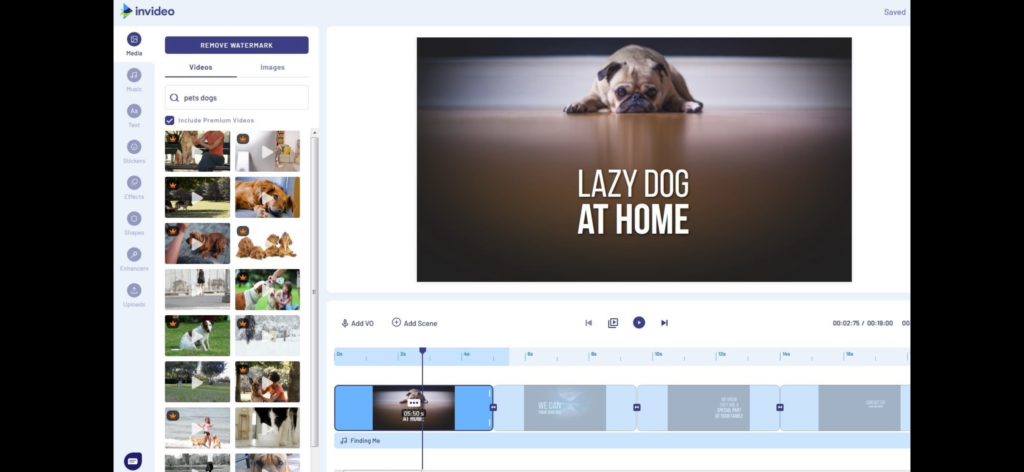
InVideo is a flexible video creation platform that combines AI automation with customizable templates. You can enter a topic or script, and the AI helps generate a complete video with scenes, music, and text.
It works well for YouTube content, marketing videos, product promotions, and social media content. It provides a balance between automation and manual editing control.
CapCut – Best for Shorts and Reels
CapCut is a powerful mobile-friendly video editing app with AI features. It is especially popular for short-form content like YouTube Shorts, Instagram Reels, and TikTok videos.
It offers automatic captions, background removal, AI voiceover, transitions, and trendy effects that help create viral-style content quickly.
Feature Comparison
Video Creation Style
Pictory focuses on converting articles or scripts into videos automatically.
Synthesia specializes in AI avatar presenter videos.
InVideo provides script-to-video creation with customizable templates.
CapCut offers manual editing supported by smart AI tools.
If you want maximum automation, Pictory is strong.
If you want a realistic AI presenter, Synthesia stands out.
If you want creative flexibility, InVideo works well.
If you want quick short-form edits, CapCut is ideal.
AI Capabilities
Pictory uses AI to detect scenes and add captions automatically.
Synthesia uses advanced AI to create lifelike digital presenters.
InVideo offers AI script generation and automatic scene suggestions.
CapCut includes AI features like auto captions, beat sync, and background removal.
Synthesia has the most advanced avatar-based AI.
CapCut is strongest for trendy social media features.
Ease of Use
CapCut is extremely beginner-friendly and works smoothly on mobile devices.
Pictory is also easy to use because of its automation.
InVideo requires some learning but offers more flexibility.
Synthesia feels more professional and structured, making it ideal for business-style videos.
If you are completely new to video editing, CapCut is the easiest starting point.
Pricing Comparison
Pictory offers a free trial but requires a paid plan to remove watermarks and access advanced features. Its pricing falls in the medium range.
Synthesia is a premium tool. It does not offer a strong free plan and is priced higher than most competitors.
InVideo provides a free plan with watermark and affordable paid plans, making it a good value option.
CapCut offers a free version with many features. A premium version is available but not mandatory for beginners.
If budget is your concern, CapCut or InVideo are safer choices. If you want professional AI presenter videos, Synthesia may justify its cost.
Video Quality Comparison
Pictory delivers clean videos using stock visuals, but customization options are limited.
Synthesia provides professional, studio-style output with realistic avatars, making it ideal for formal content.
InVideo offers dynamic visuals and high customization potential, making it suitable for creative creators.
CapCut produces engaging short-form content but is not designed for long documentary-style productions.
Best Tool Based on Your Goal
If your goal is to convert blog articles into videos quickly, Pictory is the best option.
If your goal is to create professional educational or corporate videos without showing your face, Synthesia is the right choice.
If you want balanced flexibility for YouTube content and marketing videos, InVideo is a strong all-rounder.
If your focus is growing through YouTube Shorts or Instagram Reels, CapCut is the best tool.
Monetization Potential
All four tools can help generate income, but they support different monetization strategies.
With Pictory, you can repurpose blog content and build faceless YouTube automation channels that earn through ads and affiliate marketing.
With Synthesia, you can create training videos, online courses, and offer client services to businesses.
With InVideo, you can produce affiliate review videos, marketing content, and promotional campaigns for clients.
With CapCut, you can grow a short-form channel quickly and monetize through ads, sponsorships, and brand deals.
Short-form content currently grows faster, giving CapCut strong audience-building potential.
Device Compatibility and Performance
Pictory and InVideo are browser-based tools and work best on laptops or desktops with stable internet connections.
Synthesia also performs best on a reliable laptop with strong internet speed.
CapCut works exceptionally well on smartphones and does not require a powerful computer, making it accessible to beginners.
If you only have a mobile phone, CapCut is your easiest entry point into AI video creation.
Pros and Cons Summary
Pictory
Pros: Saves time, ideal for bloggers, easy automation
Cons: Limited creative control
Synthesia
Pros: Professional look, multilingual support, no camera needed
Cons: Higher cost
InVideo
Pros: Flexible editing, affordable pricing, strong templates
Cons: Requires internet, free version has watermark
CapCut
Pros: Free, mobile-friendly, ideal for Shorts
Cons: Not suitable for long cinematic videos
Which Tool Should Beginners Choose?
For beginners in 2026, the best strategy is to keep things simple.
A powerful combination is:
Use CapCut for short-form content.
Use InVideo for long YouTube videos.
As your channel grows and income increases, you can upgrade to Pictory for automation or Synthesia for professional avatar videos.
The key is not to overwhelm yourself with too many tools at once. Master one tool first.
The Future of AI Video Tools
AI video technology is evolving rapidly. In the coming years, we can expect:
More realistic avatars
Fully automated editing workflows
Improved voice cloning
AI-generated thumbnails
Advanced personalization
Creators who adapt early to AI tools will gain a significant advantage in content production speed and consistency.
Final Verdict
There is no single “best” AI video tool for everyone. The right choice depends entirely on your content goals.
Choose Pictory if you want automation.
Choose Synthesia if you want AI presenter videos.
Choose InVideo if you want flexibility and balance.
Choose CapCut if you want viral short-form growth.
The most important factor is not the tool itself, but how consistently you create content.
Start with the tool that matches your goal, focus on quality, and stay consistent. In 2026, speed and smart use of AI will define successful YouTube creators.

Best laptop for this👉🏿https://a.co/d/05KoF0di
If you like this article, please comment.Thanks.
https://dealswithrkkapoor.in/ai-tools-for-blogging-guide-2026/🤏 This is the link to my second post. Great article! The way you explained AI video creation tools for YouTube is very helpful, especially for beginners who want to start a channel without expensive equipment. Tools like Pictory and Synthesia are really changing how creators make content. Thanks for sharing this detailed guide. Looking forward to more AI and online earning related posts on DealsWithRKKapoor!